


Webcams
3.31.45K Reviews
App Specs
- Version
- 2.0.35
- Updated On
- License
- Free
- Downloads
- 1,000,000+
- Developer
- EarthCam, Inc.
- Categories
- Travel & Local
- Platform
- Android
Screenshots




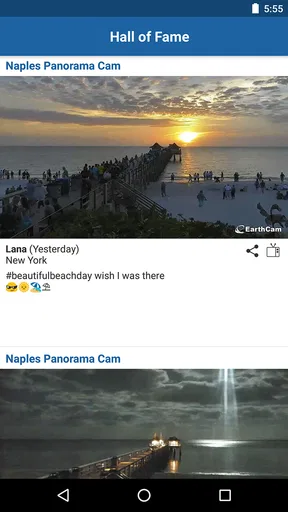
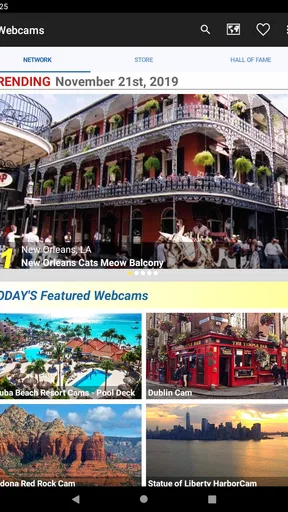
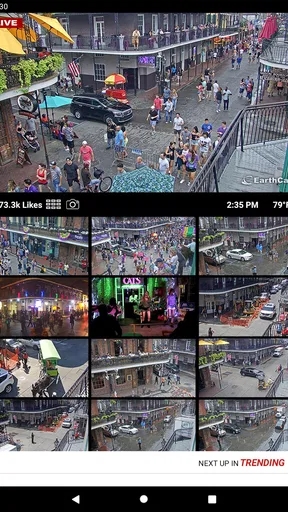

 Analysis by AppCompare
Alright, folks, let's dive into the world of Webcams, an app that promises to revolutionize how we view and interact with live streams around the globe. With its sleek interface and myriad of features, it’s definitely something worth checking out if you're into exploring the world from your screen.
Exploring the Interface
First things first, when you open up Webcams, you’re greeted with a super intuitive interface. I mean, even my grandma could navigate through this thing! The home screen is packed with a bunch of live stream options, neatly arranged in categories like beaches, cities, nature, and more. It's like having a virtual passport at your fingertips.
The search functionality is top-notch. Just type in what you're curious about, and boom, a list of related webcams pops up. Whether you want to check out the bustling streets of Tokyo or the serene beaches of the Maldives, it’s all right there. The ease of use here is definitely a standout feature.
Dive into the Features
Now, let’s talk features. One thing I absolutely love is the ability to save your favorite webcams. You know, for those times when you just want to escape to your happy place without digging through a bunch of options. Just tap the heart icon, and it's saved. Simple as that.
Another cool feature is the time-lapse function. This lets you watch what happened over the past hours in just a few minutes. It's amazing to see how a place transforms from day to night or how weather patterns change. It’s like being a little meteorologist or a time traveler!
And hey, if you're a social butterfly, you'll appreciate this: you can share your favorite streams with friends straight from the app. Just imagine getting your buddies to watch the same stunning sunset over the Grand Canyon, even if you’re all miles apart.
Performance and Reliability
Performance-wise, Webcams holds up pretty well. I’ve been using it over both Wi-Fi and cellular data, and the streams are generally smooth with minimal buffering. Of course, this can vary depending on your network, but on a decent connection, it’s like watching a live HD broadcast.
Worth Reading Before You Choose

EA SPORTS FC Mobile 26 Is a Bigger Football Game, but It Takes Time

Flipboard Shows What News Apps Must Do Beyond the Feed

Switching to Android Auto Means Rethinking Your Driving Routine

Google Calendar Makes a Crowded Week Easier to Manage

Ludo King Makes the Most of the Minutes Between Plans

Baby Panda World Brings Quick Play to Modern Phones, but Its Game Library Feels Busy
The app’s reliability is also commendable. Crashes? Rarely. Bugs? Hardly. It’s clear the developers have put a lot of effort into making sure the app runs smoothly, which is always a plus in my book.
Is It Worth Your Time?
So, is Webcams worth your time? If you’re someone who loves exploring or just needs a quick escape from reality, absolutely. It’s perfect for those moments when you need a mental vacation or want to satisfy your wanderlust without leaving your couch.
While it might not replace the thrill of actual travel, it’s an awesome way to experience the world in a new way. Plus, it’s kind of fun to play armchair traveler and discover places you might have never thought to visit.
In conclusion, Webcams is a delightful app that brings a piece of the world to your screen, all in real-time. Whether you're a nature lover, a city explorer, or just someone looking for a bit of virtual adventure, it’s definitely worth a download. So why not give it a whirl and start your virtual journey today?
Pros
- High-quality video resolution for clear streaming.
- User-friendly interface for easy navigation.
- Compatible with multiple platforms and devices.
- Offers adjustable settings for customization.
- Reliable customer support enhances user experience.
Cons
- May require a strong internet connection.
- Some features are locked behind a paywall.
- Occasional lag in video transmission.
- Limited free storage for recorded sessions.
- Might drain battery quickly on mobile devices.
FAQs for Webcams
What features should I look for in a webcam app?
When choosing a webcam app, look for features such as high-definition video quality, low-light performance, noise reduction, and compatibility with your device. Advanced features like background blur, facial recognition, and easy integration with video conferencing tools can enhance your experience. Make sure the app also offers a user-friendly interface and regular updates.
Is webcam app compatibility important?
Yes, compatibility is crucial when selecting a webcam app. Ensure that the app supports your device's operating system, whether it's Android or iOS. Additionally, check if the app works well with popular video conferencing platforms like Zoom, Skype, or Microsoft Teams. This ensures seamless integration and optimal performance during video calls.
Are there privacy concerns with webcam apps?
Privacy is a significant concern with webcam apps. Look for apps that offer strong security measures, such as end-to-end encryption and customizable privacy settings. Ensure the app has clear data usage policies and doesn't require unnecessary permissions. Reading user reviews and checking for a reputable developer can also help gauge the app's trustworthiness.
Do webcam apps consume a lot of battery or data?
Webcam apps can be resource-intensive, so it's essential to monitor their impact on your device's battery and data usage. High-definition video calls can drain battery life quickly and consume significant data. Opt for apps with power-saving modes or adjustable video quality settings to manage battery and data usage more effectively.
Can I use my smartphone as a webcam for my computer?
Yes, many webcam apps allow you to use your smartphone as a webcam for your computer. These apps typically require you to install software on your computer and connect your device via Wi-Fi or USB. This setup can be a cost-effective solution for improving video quality if your computer's webcam is inadequate.


